Your lesson rate depends on grading, a points-based system that determines your level and how much you earn per lesson. The more points you have, the higher your level and the higher your rate.
Grading takes into account your experience, teaching quality, and additional activity on the platform. It's a clear way to influence your income: you can see exactly what affects your rate and improve those metrics on your own.
Grading kicks in once you complete your trial period and get the Regular teacher status.
While you're a Trainee, your rate is fixed at 15 GBP per lesson.
🏅 Grading levels and how they affect your rate
Your rate per lesson depends on your level:
| Level | Points | 55-min lesson | 30-min lesson |
|---|---|---|---|
| Basic | 0–300 | 15 GBP | 7.50 GBP |
| Silver | 301–600 | 19 GBP | 9.50 GBP |
| Gold | 601–1100 | 24 GBP | 12 GBP |
| Premium | 1101 and above | 28 GBP | 14 GBP |
The rate for an introductory lesson is 15 GBP, regardless of your level in the grading system.
📈 How to level up in the grading system
To reach a higher level and earn more, you accumulate points. The grading system takes three main types of achievements into account.
1. Professional background
-
Teaching degree — 50 points Upload your diploma during registration if you have a higher pedagogical education.
-
Teaching experience — from 15 to 100 points Counted from the moment you started working as a teacher:
-
up to 3 years — 15 points
-
3–5 years — 25 points
-
5–10 years — 50 points
-
10–15 years — 75 points
-
over 15 years — 100 points
-
-
Advanced-level teaching — 25 points Awarded if you can teach lessons under advanced curricula.
-
Working with children with special educational needs — 50 points Provided you have the relevant qualifications and have taught at least one such lesson on Mathema.
2. Results on Mathema
Your achievements while working with students on the platform.
-
1,000 lessons taught — 10 points
-
2,000 lessons taught — 20 points
-
3,000 lessons taught — 30 points
-
80–100% conversion after the introductory lesson — 50 points If parents buy a subscription after the introductory lesson, your conversion rate goes up. Once you reach 80–100% conversion, 50 points are awarded automatically. If your conversion later drops below 80%, the bonus points are removed from your overall total.
3. Additional collaboration
Your activity beyond lessons that helps the platform grow.
-
15 points if you open 25 available hours on weekdays between 16:00 and 21:00
-
50 points if you run open lessons on Mathema's YouTube channel.
📉 When points can be deducted
If you work responsibly and follow Mathema's standards, your points only grow. But if violations happen, some points can be deducted from your balance.
4 points are deducted if:
- you didn't show up for a lesson or were more than 10 minutes late;
- you didn't make an entry in the lesson journal within 1 hour after the lesson;
- your report was written with standards violations or not on time;
- you ran a lesson without camera or sound;
- the lesson was shorter than expected (less than 30 or 55 minutes);
- you cancelled a lesson that was already in your calendar;
- you refused to work with a student after confirming;
- you behaved unethically when communicating with a student or parents.
2 points are deducted if:
-
parents leave a negative review or complaint via email, the support chat, or in public.
🕛 When your grade is updated
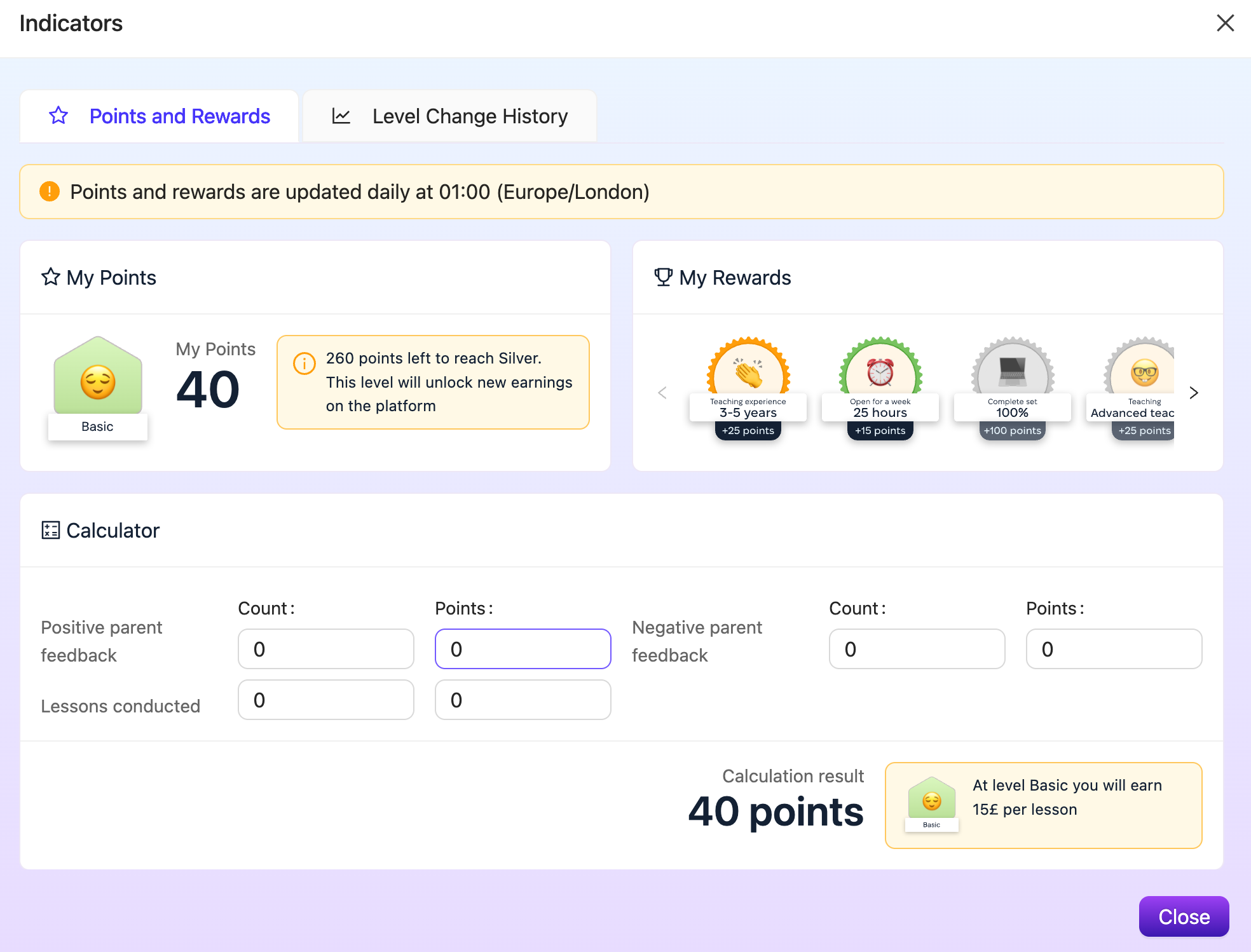
Your grade updates once a day, at 01:00 (Europe/London). If you unlock a new reward during the day, the new grade will apply after the nightly update.
❓ How to check your level in the grading system
- Log in to your profile and select My profile.
- Click Indicators under your profile photo.
Here you'll see your current level, the number of points you've accumulated, how many points are left until the next level, and all the rewards you've earned. You can also use the built-in calculator to see how your points change based on parent feedback and lessons conducted, and check your level change history.
Check your level, update your schedule, take part in additional activities, and you'll not only earn more, but also enjoy teaching with Mathema even more 🚀
