To help us verify your profile and match you with students who will feel comfortable learning with you, it’s important to fill in all sections.
A complete profile also helps parents understand your teaching style and feel confident that their child will enjoy learning with you.
👤 How to complete your Teacher profile
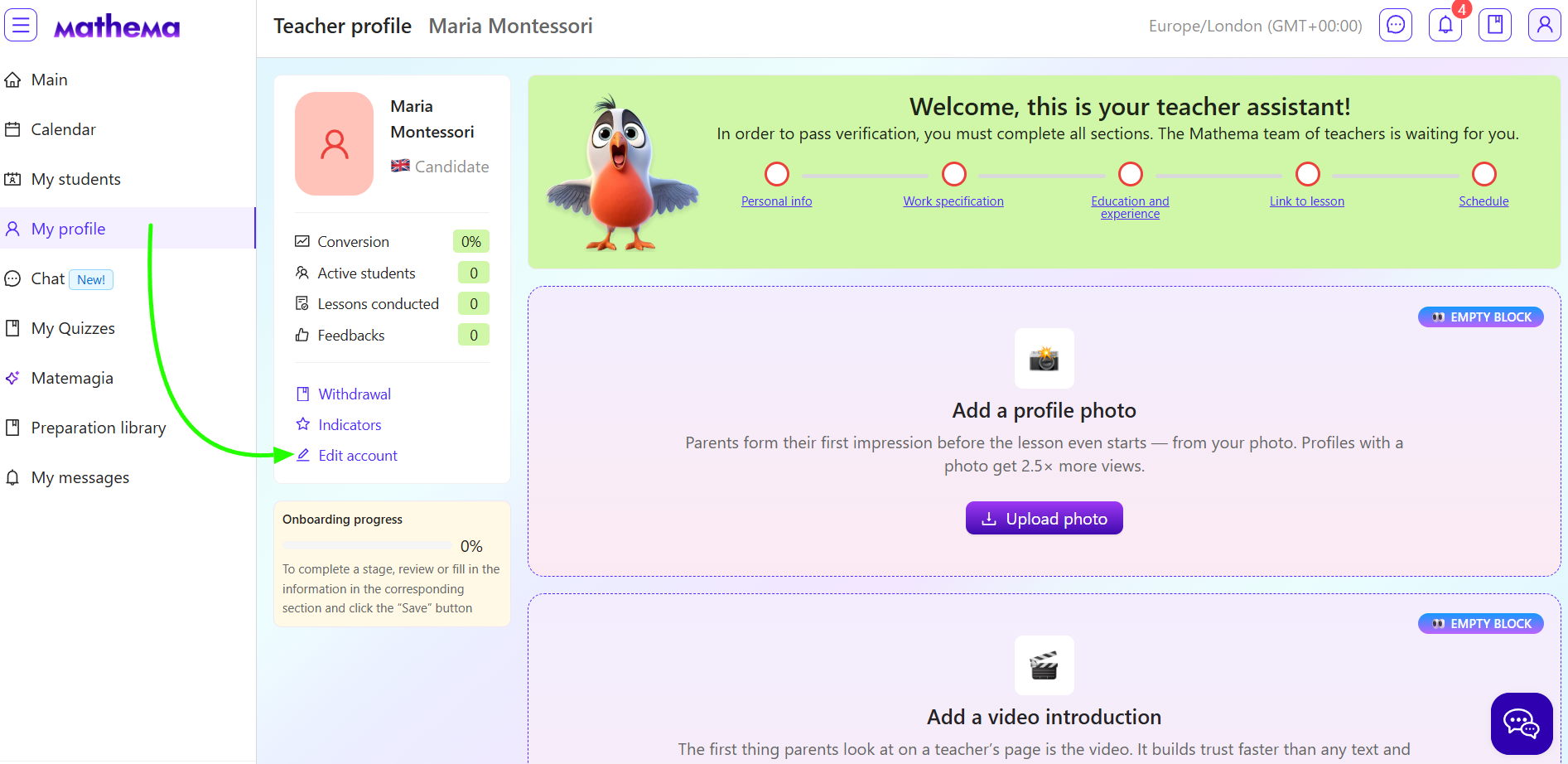
- Log in to your account and select My Profile from the menu on the right.
- Click Edit account.
- Fill in the following sections:
- Personal info. Add your basic details and a photo. Write a short introduction about your teaching style, key skills, and how you can help students.
- Work specification. In this section, include your teaching experience, the languages you teach in, and the age groups you feel comfortable working with.
This helps us match you with students where a natural and positive connection is most likely. - Education and experience. Add information about your studies and previous jobs.
- Link to lesson. Add your personal Zoom or Google Meet link.
If you don’t have one yet, please follow the instructions here: Setting Up Your Google Meet Link for Lessons - Schedule. Let us know if you are available to take new students and add the times when you are free to teach.
- Withdrawal. Add your payment information so we can send you your earnings for completed lessons.
- Messaging. This is the text that is automatically sent to parents after they view your profile — a short personal introduction from you.
A warm welcome message inviting them to a trial lesson increases the chance that families will choose you.
💡 If this section is empty, no message will be sent. - Video visit card. This is a short video about you as a teacher. 100% of parents watch a teacher’s video introduction before booking their first lesson.
You can read more about how to record it, what to say, and how to upload it on the platform in the article.
After filling in each section, click Save.
Once your profile is complete, we’ll send it for verification.
A good photo, a video introduction, and a short, honest “About me” description help parents and students quickly get to know you and choose you as their teacher.
💬 If you have any questions, feel free to message us in the platform chat. We’re here and happy to help.
